top of page
Search

Design Case Study: Artsee Mobile App

  • Writer: Cody Roberts
    Cody Roberts
  • Apr 3, 2021
  • 9 min read

Better connecting communities through shared experiences.


A solution to connecting communities through arts based events and giving a voice to underexposed artists.

Overview

Independently run arts based events for live performances and gallery showings are, for the most part, promoted through word-of-mouth and social media. Another common method is to hang flyers on street posts, cafe message boards and bar windows. My goal is to better connect people to arts based events, strengthen communities through shared experiences and help underexposed artists reach audiences.


The Problem

Underexposed artists and performers rely on the support of their local independently run arts based events spaces to connect with audiences. Unfortunately, visibility is limited for most up and coming artists as they make most of their connections through social media and local news outlets. Artists, performers and independently run arts based event spaces need a better way to connect with audiences.


The Solution

Guided by a user centered design approach, Artsee Mobile App was designed to positively impact the arts community by helping underexposed artists and independently run event spaces expand audience growth. Artsee mobile app is a solution powered by user interviews, competitive analysis and usability testing evaluations.


My Role

This is a solo project for which my responsibilities included UX research, multiple rounds of interviews, sketching, personas, user flows, site maps, information architecture, guerrilla usability testing, wireframes, prototypes, usability testing and usability test reports.


Key Skills

Heuristics Analysis, Ideation, Interviews, User Stories, Personas, Sketching, Information Architecture, Workflows, Wireframes, Visual Design.


Tools

Figma, InVision, Miro, Marvel, Overflow


Constraints

This being a solo project as a team of one, I had a short timeline within which to work. As a new designer, I didn’t have the past design experience to lean on. I instead had to learn many new skills and apply them in real time as my project progressed, all while adhering to tight deliverables schedules. Usability testing was primarily done remotely due to COVID-19.


Design Process

I followed a user centered design process making sure the end user’s needs were considered through every step.


Discovery

My first priority was to empathize with users to better understand their needs and wants when searching for, or hosting, arts based events in their communities. This was done through primary and secondary research methods.


Secondary Research

Here are some insights from the secondary research I conducted:


A website excerpt from independently run event space, GHOST Gallery New York: Los Angeles, “The focus of the gallery is to aide in the development of emerging artists and provide an open platform for new ideas.”


A 2016 Next Avenue website article on community based art writes that “telling stories through music, art or cathartically sharing in the experience helps remind us that we’re all connected.”


Per, Americans for the Arts, surveys show Americans believe the arts unify their communities regardless of age, race, and ethnicity. They agree that the arts help them understand other cultures better, which is a perspective observed across all demographic and economic categories.


“The fostering of creativity is important for the overall health of our communities.”


Competitive Research

Below is a heuristics analysis for the product services of Facebook Local, Eventbrite.com and Meetup.com. Although most of the interview participants stated they patch-worked their event promotion or event searches using Instagram, local papers, radio and word of mouth, these existing websites and mobile apps currently act as the standard for event sharing platforms. Better understanding these competitors and their areas of opportunity helped me define creative solutions.


Facebook Local

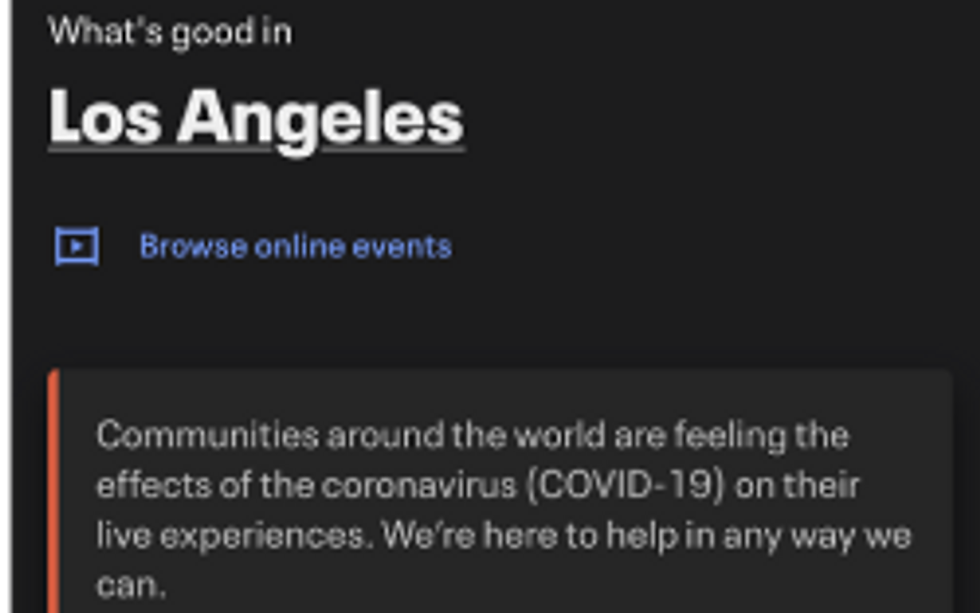
Facebook Local packs in a lot of information, options and functions for a user seeking or creating an event. The map tool is powerful and detailed with easily identifiable icons powered by Yelp. My end users are between the age of 21–40 years old and research shows younger people are using other apps more frequently than Facebook.


Key Findings:

  • Informative onboarding experience.

  • Useful home page with a lot of functions packed in.

  • No tab bar or navigation bar tools, uses expandable UI cards.

  • Consistency throughout the app for all functions.

  • Heavy cognitive load for a novice user.


Eventbrite

Eventbrite has the feel and aesthetic of a well designed ticket purchasing app. The user flow is comfortable and smooth without any clunky stops. The navigation bar at the bottom of the screen makes it easy for the user to return Home, Search, view Tickets, view Favorites and view user profile. Eventbrite is more of an event ticket purchasing app than a community engagement tool.


Key Findings:

  • The landing page is easy to understand, gives a clear explanation of user controls/functions.

  • Easily identifiable calls to action empower the user to navigate the app freely.

  • A novice user would be able to navigate the app, good flow

  • Lacks creative individualism.

Meetup.com

Meetup.com is an excellent platform for community engagement. I was initially impressed by the simplistic design and ease of use. A novice user can easily use Meetup.com to find an event or group of their interest. Despite a simple design for the website and the app, it does have a clunky feel. I did not gain confidence as I continued to use the website or app. The overall user flow has room for improvement especially when introducing new information. While the intent feels authentic, the aesthetic and design is average at best.


Key Findings:

  • Excellent onboarding experience. Users prompted for interests, hobbies etc. Allows the user to customize their experience and find nearby events.

  • Clunky user flow as the app lacks direction or calls to action that help guide the user to relevant information.A novice user would be able to navigate the app, good flow

Primary Research

I conducted my primary research through user interviews. Guided by a user centered design process, my first step was to interview artists, performers, event seekers between the age of 21–45 who have experience hosting, performing or attending independently run arts based events. I created a screener survey to help identify interview participants.


Screener Survey & Results

Below are a few screenshots taken from my screener survey and some of the results used to identify participants:


Screener Survey & Results

I conducted interviews with five participants who fit the user survey criteria and these interviews were incredibly important to better understanding the needs and wants of my end users. The interviewees candidly discussed their trials and tribulations self promoting events.

The main difficulties were:

  • Low event turnout.

  • Networking challenges/expanding network.

  • Countless lost hours spent self promoting through social media tools and local media outlets like newsprint and radio.

“I spend an equal amount of hours promoting my work as I do creating it.” “I worked hard to self promote through Instagram and over 300 people saw my post but only 20 people showed up to the event.” “They make the bands sell the tickets and if not enough tickets are sold you have to pay the venue.” “For a lot of DIY start up bands selling merchandise at shows is their main source of funding their tour. The money made from merch pays for gas to get from one to the next.”

Define

The next step was to define the problem. The user interviews gave insight to how artists and event seekers are promoting and finding events. I organized the feedback using affinity maps to create personas, user stories, user flows and rough draft mobile app sketches to prepare for guerrilla usability testing.


Affinity Maps

Affinity mapping helped me group important insights from my interviews to identify similarities in their needs and desires. I was able to make these discoveries:

  • Reliance on social media tools like Instagram for self promoting events.

  • Key quotes for developing user personas.

  • Desire for networking accessibility with peers and event seekers.

  • Stress venues put on artists and performers to self promote events.


User Persona

I identified two user personas that best represented the type of end users who would be using the product solution.


Photo Phoebe


Victor the Voyeur


Ideate

I then began ideating potential solutions to help better connect people to arts events based on the following criteria:

  • Help underexposed artists gain exposure.

  • Enable artists and performers connect with their peers and grow their networks.

  • Give artists and performers the tools and resources to spend less time on self promoting and more time creating.

  • Help event seekers find independently run arts based events in their community.

Site Map

I created a sitemap for the product solution to outline the screen hierarchy.


User Flows

I created two user flows, one flow for a new user or new event seeker and the other for a returning user or artist.


Design

After establishing an information architecture outline for the product solution I moved into the designing phase of my case study.


Sketches

I created screen sketches based on the user flows to visualize how they would function on a mobile device. Below are some key screens:


Onboarding


Event Browsing


Create an Event


User Profile


Search Filters & Notifications


Guerrilla Usability

With a paper prototype, I conducted 5 guerrilla usability tests to gather usability design feedback. I used a Marvel POP prototyping application for testing.


User Tasks

  • Use the app to find more information about an event and its location.

  • Use the app to create or post a new event.

  • How might you locate more events near your current location?

Key Insights:

  • The users did not attempt to utilize the hamburger menu through any of their interactions. When asked where they would go to make changes to their account all the users navigated to the profile icon in the upper right, not the menu to the left.

  • Two of my test users had concerns about how to make changes to their settings for privacy, notifications and how to save events. Those users told me they were looking for some sort of gear or settings type icon.

  • The plus symbol icon for creating a new post/event was confusing to usersOne user told me they clicked the plus symbol icon expecting to add a photo because it reminded them of Instagram.

Low Fidelity Wireframes

After gaining important insight from the guerrilla usability testing I began digitizing my paper sketches to create low fidelity wireframes. This helped me to design a skeleton of the screens without visual design elements like color and iconography.


Onboarding


Browse Event


User Profile


Map View, Search & Notifications


Brand Platform, Logo & Style Guide

Brand Identity


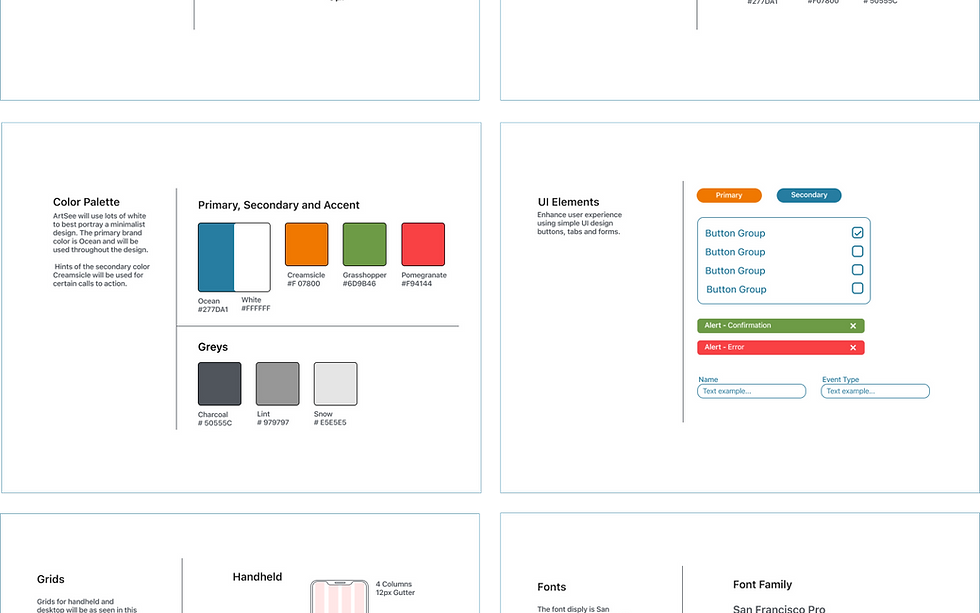
Brand Logo & Style Guide


High Fidelity Screens

I conducted two rounds of moderated and unmoderated usability testing sessions for my high fidelity mockup designs using InVision prototyping.


The moderated usability testing sessions were conducted through Zoom call meetings. I observed the participants interacting with the InVision hifi mockup prototype. I created a usability testing script with a set of instructions for users to test the red routes.


I received incredibly useful feedback from my testing that helped further the completion of Artsee mobile app design.

  • Strong desire for filter and settings functions/accessibility from users.

  • Removal of hamburger menu to make better use of screen real estate as desired by users.

  • Users were originally indecisive at Tags screens and needed further clarification.

  • The flow of creating a new event needed reconstruction, users wanted to enter their event details first.

  • The language used for buttons caused a strong emotional response as users experience anxiety when reading “delete post” for example.

  • Users continued to express a strong desire for customization to express individuality.

After the two rounds of usability testing and design iterations, I then created the final high fidelity screens for Artsee mobile.


Onboarding

The onboarding screens allow users to sign up with Google, thus sharing their profile photo and name. The user is then promoted to select their interests helping Artsee to connect the user with the best event matches. Allowing for location sharing helps Artsee locate nearby events.


Browse Events

A simple home screen allows users to browse events in a scrolling feed, then select an event for more information. The user can then access the event location, details, engage with others in the comment section, share this event with others and Favorite the event.


Create an Event

By clicking the plus icon the user is able to Create a New Event. The user is guided through a simple process to add event details, choose a cover photo, select event tags and review before posting.


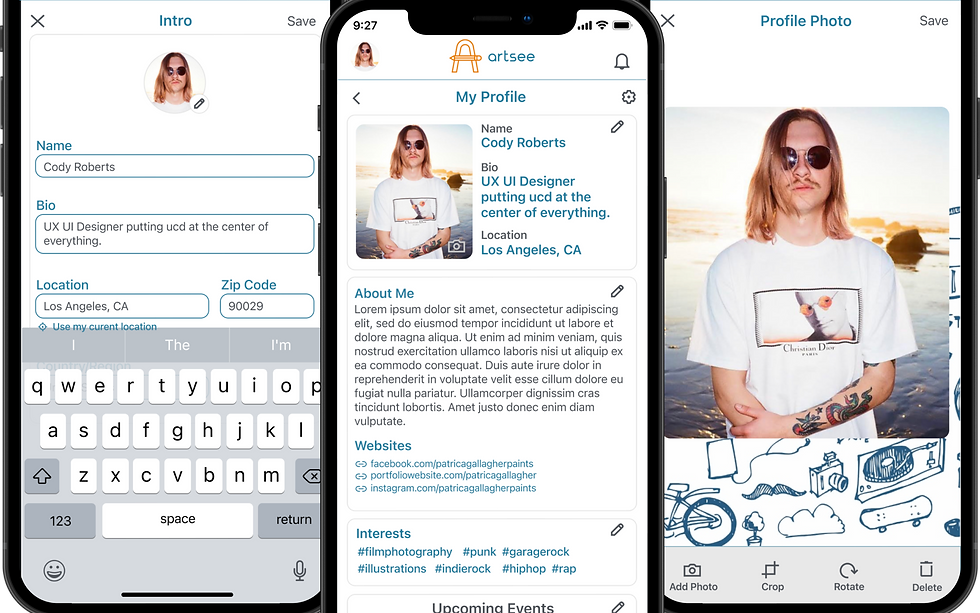
User Profile

Access My profile to make changes to profile photo, bio header, about me section, interest tags, upcoming events and account settings.


Notifications, Favorites & Map View

Stay up to date with Notifications, save your favorite events and use Map View to search nearby events.


Final Thoughts

I learned a lot during this process through several rounds of testing, methodologies and user interactions to better understand how to meet the needs of my end users. This process from beginning to end, was guided by a user centered design focus which aided me at every step.

My early hypothesis was that there is an area of opportunity to better serve up and coming artists and help event seekers find arts based events. I initially saw this problem through a narrow lens of personal experience, unaware of the challenges facing artists and performers.

Through my research I learned how art acts as a vessel to communicate ethnic, spiritual, political and cultural differences. Exposure to cultural diversity helps strengthen the bonds of communities through shared experiences and opens new dialogues.

If I were to continue to develop and design Artsee, I would love to expand on user feedback given in reference to the quality and security of event postings. During interviews users expressed concerns about ways in which Artsee mobile app could be manipulated or used for unintended purposes. I believe there is great value in this feedback and given the time I would love to explore better ways to safeguard the integrity of Artsee and its users.

As a UX UI designer my job is never truly done, but rather a continuation of growth and progress.

Thank you for reading my case study and remember to support your local arts!

“Strive for progress not perfection.”


  • Ui Ux Design


Comments


bottom of page